Chat with AI Agents
This guide explains how to create chat conversations with Redbelt’s AI agents.
Redbelt agents are AI assistants that can:
- Search your knowledge base
- Browse the internet
- Analyze data
- Use custom tools
You can give our agents arbitrary instructions, grant them access to certain tools, and force tool calling order for more granular control.
The Agents API consists of two main steps:
- Start Agent Run - Send a message and create a conversation thread
- Stream Response - Receive the agent’s response in real-time via Server-Sent Events
Chat Flow Diagram
Section titled “Chat Flow Diagram”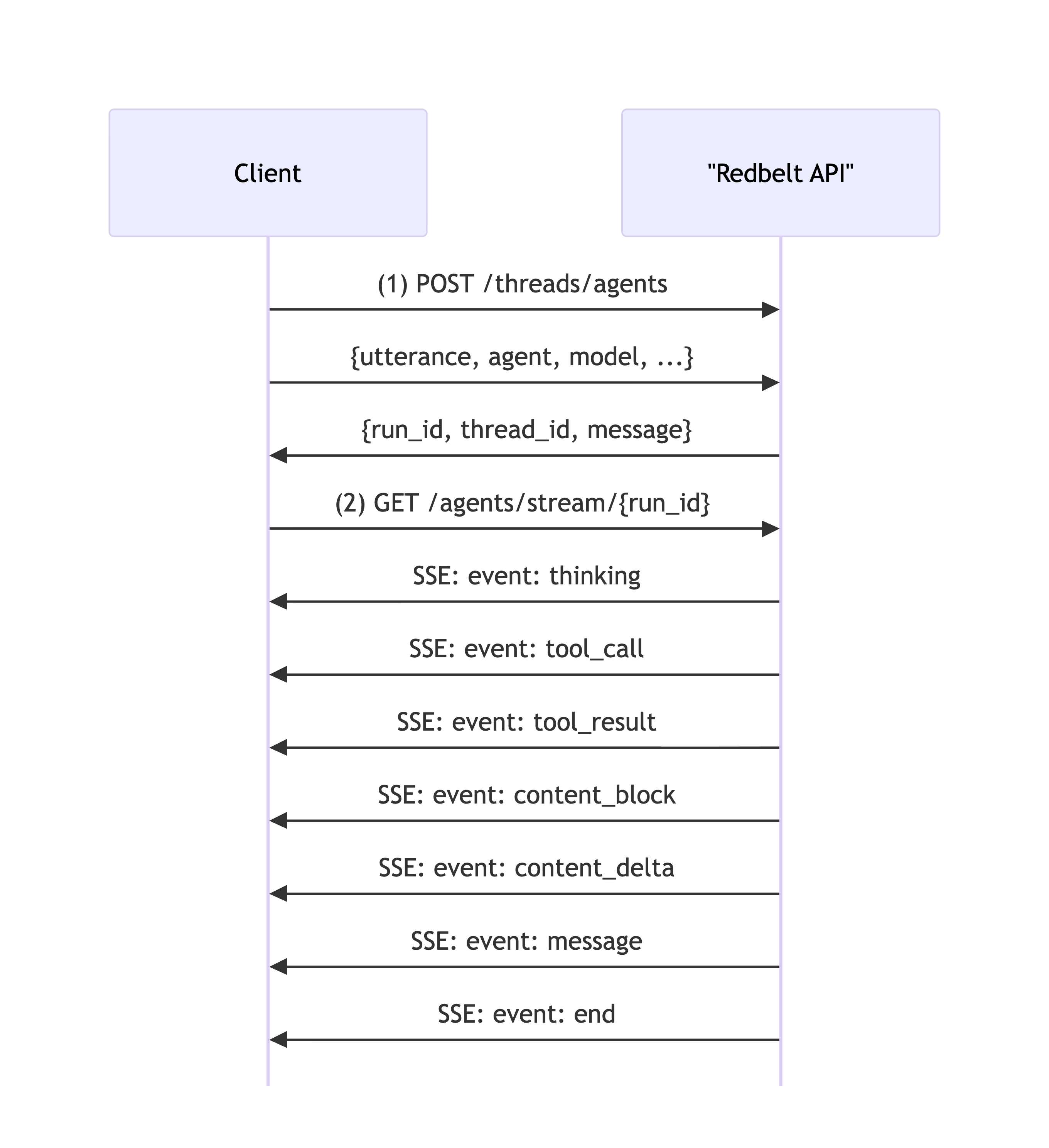
Prerequisites
Section titled “Prerequisites”Before using the Chat API, ensure you have:
- A valid API key (see API Quickstart)
- Python 3.8+ with
requestslibrary - Optional: Uploaded files or configured folders for file search
Step 1: Start Agent Run
Section titled “Step 1: Start Agent Run”Create a new conversation or continue an existing thread by sending a message to an agent.
Available Agents
Section titled “Available Agents”| Agent | Description | Best For |
|---|---|---|
orchestrator | General-purpose agent, good at all tools | Most conversations, general tasks |
extractor | Specialized in extracting structured data from files | Getting tables from PDFs, invoices, resumes |
for_each | Batch processes files with summarization, translation, or custom prompts | Processing many files at once |
deep_research | In-depth research using multiple sources | Comprehensive research reports |
analyzer | Data analysis using Python code execution | Analyzing data, creating charts, complex math |
Available Tools
Section titled “Available Tools”| Tool | Description | Requires Files |
|---|---|---|
file_search | Search through uploaded documents and retrieve relevant chunks | Yes |
internet_search | Search the web for current information | No |
extract | Extract structured data from documents into tables | Yes |
for_each | Summarize, translate, or run custom prompts on each file/page | Yes |
browse_url | Browse URLs and return content in markdown (includes YouTube transcripts) | No |
code | Run Python code in a sandboxed Jupyter notebook for data analysis | No |
mermaid | Generate Mermaid diagrams and flowcharts | No |
extraction_template | Generate custom extraction templates for the extract tool | No |
Example
Section titled “Example”import osimport requestsfrom dotenv import load_dotenv
load_dotenv()
api_url = "https://redbelt.ai/api"session = requests.Session()session.headers.update({ "Authorization": f"Bearer {os.getenv('REDBELT_API_KEY')}", "Content-Type": "application/json"})
agent_request = { "utterance": "What are the key findings in the Q4 report?", "agent": "orchestrator", "model": "gpt-5", "folder_ids": ["018c1234-5678-7abc-def0-123456789abc"], "allowed_tools": ["file_search"]}
response = session.post(f"{api_url}/threads/agents", json=agent_request)response.raise_for_status()
data = response.json()["data"]run_id = data["thread_run"]["run_id"]thread_id = data["thread_run"]["thread_id"]
print(f"✅ Agent started!")print(f"Run ID: {run_id}")print(f"Thread ID: {thread_id}")Step 2: Stream Agent Response
Section titled “Step 2: Stream Agent Response”Stream the agent’s response in real-time using Server-Sent Events (SSE).
Event Stream Format
Section titled “Event Stream Format”The endpoint returns Server-Sent Events with different event types:
event: answerdata: {"message_id": "...", "content": "Based on", "created_at": "2025-10-02T10:30:00Z"}
event: answerdata: {"message_id": "...", "content_batch": " the Q4 report"}
event: tool_calldata: {"tool_call_id": "...", "tool_id": 1, "tool_name": "file_search", "arguments": {...}}
event: file_tool_resultdata: {"tool_call_id": "...", "content": "Processing file...", "progress": 0.5}
event: tool_result_completedata: {"tool_call_id": "...", "content": "Found 3 results", "total_cost_usd": 0.05}
event: handoffdata: {"message_id": "...", "from_agent_slug": "orchestrator", "agent_slug": "analyzer"}
event: usagedata: {"message_id": "...", "total_cost_usd": 0.15, "response_seconds": 2.3}
event: enddata: null
event: errordata: "An unexpected error occurred. Please try again."
Event Types
Section titled “Event Types”| Event | Description |
|---|---|
answer | Agent response text (initial or streaming deltas) |
tool_call | Agent is calling a tool |
file_tool_result | Progress updates from file processing tools |
tool_result_complete | Tool execution completed with final results |
handoff | Agent transferring to another agent |
usage | Cost and timing information for completed actions |
end | Stream completed successfully |
error | An error occurred |
Agents Request Example
Section titled “Agents Request Example”Here’s a complete example that creates a conversation and streams the response:
import osimport requestsimport jsonfrom dotenv import load_dotenv
load_dotenv()
class RedbeltChat:    def __init__(self):        self.api_key = os.getenv("REDBELT_API_KEY")        self.api_url = "https://redbelt.ai/api"        self.session = requests.Session()        self.session.headers.update({            "Authorization": f"Bearer {self.api_key}",            "Content-Type": "application/json"        })
    def chat(self, message, thread_id=None, folder_ids=None, tools=None):        request_data = {            "utterance": message,            "agent": "orchestrator",            "model": "gpt-5",            "thread_id": thread_id,            "folder_ids": folder_ids or [],            "allowed_tools": tools or ["file_search", "internet_search"]        }
        response = self.session.post(            f"{self.api_url}/threads/agents",            json=request_data        )        response.raise_for_status()
        data = response.json()["data"]        run_id = data["thread_run"]["run_id"]        thread_id = data["thread_run"]["thread_id"]
        print(f"💬 You: {message}\n")        print(f"🤖 Assistant: ", end="", flush=True)
        full_response = self._stream_response(run_id)
        return {            "run_id": run_id,            "thread_id": thread_id,            "response": full_response        }
    def _stream_response(self, run_id):        stream_url = f"{self.api_url}/threads/agents/stream/{run_id}"        full_response = ""
        with self.session.get(stream_url, stream=True) as response:            response.raise_for_status()
            event_type = None
            for line in response.iter_lines(decode_unicode=True):                if not line:                    continue
                if line.startswith("event: "):                    event_type = line[7:].strip()                    continue
                if line.startswith("data: "):                    try:                        data = json.loads(line[6:])
                        if event_type == "answer":                            # Handle both initial content and streaming deltas                            content = data.get("content", "")                            content_batch = data.get("content_batch", "")                            text = content or content_batch                            if text:                                print(text, end="", flush=True)                                full_response += text
                        elif event_type == "end":                            print("\n")                            break
                    except json.JSONDecodeError:                        continue
        return full_response
if __name__ == "__main__":    chat = RedbeltChat()
    result = chat.chat(        message="What are the main topics in my documents?",        folder_ids=["018c1234-5678-7abc-def0-123456789abc"],        tools=["file_search"]    )
    thread_id = result["thread_id"]
    result2 = chat.chat(        message="Can you elaborate on the first topic?",        thread_id=thread_id,        folder_ids=["018c1234-5678-7abc-def0-123456789abc"],        tools=["file_search"]    )
    print(f"\n📊 Thread ID: {thread_id}")
Continue Existing Conversations
Section titled “Continue Existing Conversations”To continue a conversation, pass the thread_id from the initial response:
result1 = chat.chat("What is machine learning?")thread_id = result1["thread_id"]
result2 = chat.chat(    message="Can you give me an example?",    thread_id=thread_id)
Error Handling
Section titled “Error Handling”Common Error Responses
Section titled “Common Error Responses”401 Unauthorized
Section titled “401 Unauthorized”{ "message": "Unauthorized", "status_code": 401}404 Not Found - Invalid Run ID
Section titled “404 Not Found - Invalid Run ID”{ "message": "Run not found or expired", "status_code": 404}400 Bad Request - Invalid Tool
Section titled “400 Bad Request - Invalid Tool”{ "message": "Invalid tool: unknown_tool", "status_code": 400}Best Practices
Section titled “Best Practices”- Handle stream disconnections - Implement reconnection logic
- Set timeouts - Agents can take 1-10 minutes for complex tasks
- Monitor costs - Track
total_cost_usdin message events - Validate tools - Ensure requested tools are available
- Provide context - Use
folder_idsorupload_idsfor better results - Parse events carefully - Different events have different data structures
Advanced Features
Section titled “Advanced Features”Force Tool Usage
Section titled “Force Tool Usage”Force the agent to use a specific tool:
request_data = { "utterance": "Search for quarterly reports", "required_tool": "file_search", "folder_ids": ["018c1234-5678-7abc-def0-123456789abc"]}Pre-Run Tools
Section titled “Pre-Run Tools”Execute a tool before the agent runs:
request_data = { "utterance": "Analyze the search results", "pre_run_tool": "file_search", "tool_parameters": { "file_search": { "query": "quarterly financial results" } }}Custom System Instructions
Section titled “Custom System Instructions”Override default agent behavior:
request_data = { "utterance": "Explain quantum computing", "system_instructions": "You are a physics professor. Explain concepts using simple analogies."}Specialized Agent Examples
Section titled “Specialized Agent Examples”Extract Tool - Structured Data Extraction
Section titled “Extract Tool - Structured Data Extraction”Use the extractor agent to extract structured data from documents:
extract_request = {    "utterance": "Extract candidate information from these resumes",    "agent": "extractor",    "folder_ids": ["018c1234-5678-7abc-def0-123456789abc"],    "allowed_tools": ["extract"],    "tool_parameters": {        "extract": {            "extraction_template_id": "018c1234-5678-7abc-def0-987654321234"        }    }}
response = session.post(f"{api_url}/threads/agents", json=extract_request)run_id = response.json()["data"]["thread_run"]["run_id"]
The extractor will:
- Extract data from each file using the template
- Return results in a structured table format
Common Extract Use Cases:
- Extract data from invoices, receipts, or forms
- Parse resumes for candidate information
- Extract key metrics from financial reports
- Pull structured data from contracts
For Each Tool - Batch Processing
Section titled “For Each Tool - Batch Processing”Use the for_each agent to process many files at once:
for_each_request = {    "utterance": "Summarize each quarterly report focusing on revenue and key risks",    "agent": "for_each",    "folder_ids": ["018c1234-5678-7abc-def0-123456789abc"],    "allowed_tools": ["for_each"],    "tool_parameters": {        "for_each": {            "delimiter": "file",            "type": "summarize",            "custom_instructions": "Focus on revenue figures and key risks mentioned"        }    }}
response = session.post(f"{api_url}/threads/agents", json=for_each_request)run_id = response.json()["data"]["thread_run"]["run_id"]
For Each Processing Types:
-
Summarize: Create summaries of each file
{"type": "summarize","custom_instructions": "Focus on executive summary and conclusions"} -
Translate: Translate files to another language
{"type": "translate","language": "Spanish"} -
Custom: Apply custom prompts to each file
{"type": "custom","custom_instructions": "Extract all dates mentioned and categorize by year"} -
Process by Page: Process each page individually
{"delimiter": "page","type": "summarize"}
Analyzer Agent - Data Analysis
Section titled “Analyzer Agent - Data Analysis”Use the analyzer agent for data analysis and visualization:
analyzer_request = {    "utterance": "Analyze the sales data and create a chart showing trends over time",    "agent": "analyzer",    "upload_ids": ["018c5678-1234-7def-abcd-ef0123456789"],    "allowed_tools": ["code"]}
response = session.post(f"{api_url}/threads/agents", json=analyzer_request)
The analyzer uses Python code execution to:
- Analyze tabular data from Excel/CSV files
- Create charts and visualizations with matplotlib
- Perform complex calculations
- Generate reports and export files
Need Help?
Section titled “Need Help?”- 📖 Check out our API Quickstart Guide
- 📖 Our Full API Reference has more details on the API
- 📧 Contact support@redbelt.ai